Jr Software Developer Project Lead

Huh? What’s that? The title makes no sense and it’s an oxymoron?

Well normally you’d be correct and you’d never see a Jr Developer in a Project Lead role, but in the magical land of startups, anything is possible.

Setting the Scene

The story begins with when a couple of UX/UI designers and a software engineer, all Flatiron Alumns, decided to start an agency called City of Wind Design. That one engineer invited me onto the agency so that we can all work with real clients, develop real world experience, and practice our craft while searching for full time employment. At City of Wind Design, I ended up working on many things outside the scope of Software Development, but also outside the scope of a typical Jr Developer. This was becoming a project lead for an in house e-commerce project while on-boarding two new software developers as well.

There I was, timid Jr Developer who was also working on another project and was given this management-like task. The situation proved to be daunting at first. Exciting, of course, but I wanted to provide a great experience to our two new developers while creating high quality code for a high quality project. While we are a few weeks into the project, I believe we are through the toughest parts of the project. These being the toughest tasks any engineer has ever faced. Social interaction and proper communication.

Plot Conflict

Interestingly enough, the biggest time eaters wasn’t coding or even frustrating bugs. Instead it was communicating between the Design team lead and my own team members. This all included learning how the design team worked, what they tangibly brought to the table, and making sure that all of my fancy words made proper sense. Obviously, these weren’t fancy words, but most non-developers don’t really understand what a schema, hash, migrations, or CRUD means from basic context alone.

Part of the issue was also getting to know my team well enough to understand their strengths, preferences, and pace. That last point is the hardest to determine. In today’s world, society instills into us that we need to grind and always hustle just to get by, all the while putting an eager face on and keeping any complaint internal. As part of the agency’s vision and my own philosophy, I did not want to continue this cycle. I wanted to help these engineers by giving them code and features to work on while also not overloading them and burning them out. On the other hand, I also didn’t want to give them so little work that the project barely moves forward and that the developers themselves don’t become unaccustomed to these expectations.

Conflict Resolutions

This was complex scenario with a lot of challenges that wasn’t directly related to each other. As such, I had to step back and really evaluate my position and understand it. To solve the Design team communication issue, I decided to sit in on Design meetings to observe. The Design team being the wonderful individuals that they are, indulged me with answers to any questions I had, no matter how simple they may have been. While this process is ongoing, I have learned so much of what I have available to me that I didn’t realize I had.

To solve my time consumption issue, I blocked off time just for communication or discussion and also for coding. For it to be effective, I had to strict on these divisions to avoid distractions and the time wasting that multi tasking is known for.

To solve my team responsibility concerns, I continually ask for general feedback but also feedback on specific actions I take that I’m not sure are the best decisions and also on communication tone. It’s easy to forget that the many facets of language, such as satire and energy, aren’t as easily translated across text than in person. I also make sure to not just make my team feel heard, but actually are. Furthermore, I organize an agenda document before team meetings to stay on track over video calls and to make sure that all important items are covered.

Conclusion

As scary as this position seems, it is doubly exciting. This is an excellent opportunity to really determine what practices are best from a project lead and project member perspective. However, accountability and responsibility are the biggest lessons here. The forward movement of a project is traced back to me, but the quality and success of it is due to the whole team. Team camaraderie has always been my favorite part of Software Development.

Pawns: Back end analysis and thoughts

This week we dive into the back end code of my Flatiron Capstone project. Here we can see the choices that I made and I’ll also talk about the consequences of them. Furthermore, I also want to offer thoughts on how I would tackle them now, what I would change, and what actually wasn’t too bad in retrospect.

To give a quick summary on the scope of the capstone, essentially, I wanted to create a news website, like the NYTimes, where the sole subject is chess and chess related news. The platform would allow professional writers and journalist to write articles as well as let amateurs or general enthusiasts give out their thoughts in a blog post manner. Feel free to read the first post in these series, it can be found here: https://wordpress.com/block-editor/post/alejandrolinan.home.blog/197

Schema

Taking a quick look at my schema, we can quickly acknowledge some issues. Overall, it isn’t bad, more than anything it needs to be less redundant and more concise. Articles and Blogs are virtually the same, even though they are very different in ideology. Furthermore, the only way a user is checked to be a writer is through a boolean column. Instead, I should have create a separate table just for writers and one just for general enthusiasts and have had the columns be more topic specific. Another issue here is the first table: ‘a_votes’. I never actually use this table in the mvp, therefore it wasn’t necessary, and even if it was, the naming convention isn’t straightforward.

Schema image 1
Schema image 2

Seed File

At first glance, it isn’t very appealing to look at. The hyperlinks are messy and instead of hyperlinking images located online, a file system of images should have been utilized instead. Then, we have the lists of names which is iterated through to create these users. That, in it of itself, isn’t too bad, but is a little redundant when after the ‘each’ enumerable, I have a separate User.create occurrence. I should have spent some time, after completing the MVP, on cleaning up the seed file code for future development and testing. Then again, I was more concerned with simply making the backend work like I wanted it to than making it all look shiny and neat. Fortunately, I now realize hygienic code is much more important that I previously thought. I now practice in a very methodical manner that prevents code from becoming messier as time goes on. If anything, this change in my coding practices, is a smart investment that saves a lot of time in deciphering and debugging code.

Seed File image 1
Seed File image 2

Controller

Here, I wanted to take a single method that portrays my controllers’ code without having to view every single controller and every method within the controllers. The biggest issues I see now are my lack of validations and serializers. The former helps with preventing bugs and debugging as well as security to the code. The latter with security but also viewing JSON data in a better manner.

Model

Again, reviewing just one model here, we can see that I forwent validations, which again, I would never do today for multiple reasons. The other problem I see here is creating relationships with tables that are never used at all in the code. This is more indicative of a planning issue. I should have been more reasonable with my MVP expectations as well as had a better understanding of the platform I was trying to create.

Routes

My routes, overall, are straightforward, especially with the ‘custom’ routes I made. For example, post ‘/post_article’ or get ‘get_comments/:user_id’. What I should have done different is under the resources routes of users, articles, comments, replies, and blogs. I should have been pickier on what CRUD functionalities I was actually using and wanting to let through to the frontend.

Conclusion

Overall, most of the problems I see with my code now, were caused by simply being a novice programmer with a lack of deeper understanding on the importance of hygienic code and planning ahead. Even back then, I already recognized the importance of these practices, however, I vastly overestimated my skill and planning in these regards. Moving forward, I have become a lot less rigid in the belief of ‘one size fits all’, instead I continue with an open mind always trying to adjust to the task at hand.

Pawns: My Flatiron Capstone, analysis, revisions, and moving forward.

In the next few blog posts, I will dive into my Flatiron Capstone, the Frontend and Backend. I’ll look into the appearance, the choices I made, and why I made them. Furthermore, I’ll also dive into what I would change and why I would change it. I’ll also discuss what I’ve learned and how I would proceed with my future projects and how they will differ from this capstone.

Today, we’ll briefly look at the Backend code but the main focus is to summarize the web application before taking a deeper dive. You can find it here: https://pawns-chess.herokuapp.com/

The first thing to note, is that the web application requires an account to view all the content and access all features. Therefore you can use the credentials ‘mark’ and ‘guest’ as the username and password instead of creating an account.

After logging in you can view the dashboard which gives an article feed with an list of NYTimes chess-related articles on the side bar. In the nav bar there is also a button to view a blog feed.

Upon first look, there are a lot of things awry. I originally programmed this on a MacBook, which has a much smaller screen than my 17″ Dell laptop. You can easily see the main article feed and the sidebar feed being placed in an oddly relational manner. Furthermore, there’s a lot of empty space at the bottom of the screen and to the right. It would have taken a bit more work to add some responsiveness, but obviously it would have been worth it. At the time, I had little experience with css or scss so I used the Semantic styling framework for this application. In hindsight, using bootstrap would have been the best way to go, especially given my limited time constraint.

There are some other things that are off with this design, but I’ll go into further detail in a future Frontend Capstone blog.

Now we’ll take a look into the blog feed. Well, will you notice that? Not much different from the article feed seen in the dashboard.

The responsiveness here looks much better, but that’s due to the fact that it’s the only item in this page. It could still be made better by resizing the feed and the text. The main issue lies with redundancy. The idea was to have a platform where journalists would create professional articles and regular people could create amateur blogs which would remain opinionated. Looking back, my time would have been better spent on creating a better feature, cleaning up my code, or improving my styling.

Now we’ll take a look at the single page views of an article and a blog. Would you look at that…

Bug Alert! The blog isn’t loading! Since everything else is working then there must be some fetch shenanigans going on in my frontend code that is off. Unfortunately, these errors and bugs happen when the code isn’t hygienic enough or simply isn’t written correctly. I could have prevented this by taking more time to test my app and making my code more future proof.

Anyways, let’s look back at the article view. Again, since this only has one main component (which is really two, the article and comment feed) the responsiveness doesn’t look too bad, but again it could be spruced up. A couple of things to note is that the article structure needs to be improved with indentation, text spacing, and having image options would drastically help as well. Another thing to see are the comments as well. They could be spaced much better and adding some responsiveness would be nice too. The buttons could be redesigned as well.

After reviewing all these main features let’s take a quick look at my backend schema. Understanding the tables and their columns is a great way to understand the logic of any application before beginning work on it. It helps understand user stories, how they work, and how to manipulate them.

My biggest issue with my schema, is that it remains a little too simplistic and there’s plenty of room to improve and add to the application that would drastically improve the possibilities and function of the web application overall. Some smaller issues are some of the naming conventions, such as in the ‘users’ table. ‘profile_pic’ and ‘profile_background’ could be reduced to something like ‘pic’ and ‘background’ which remain intuitive but easier and less complex to type out and work with in programming.

Conclusion

There are a lot of basic and semi-complex issues with my capstone. Most of these stemming from time constraints and lack of css/styling knowledge. Others stemming from the very roots of the schema. Further still, the design and lack of responsiveness of the application itself. On one hand, it’s a little cringe and embarrassing looking at my naive mistakes, however, on the other hand, it gives me some pride knowing how far I’ve come in the few months since creating this app. I now know much better practices and a lot of the roadblocks that seemed like boulders back then, now seem like small traffic cones. I look forward with my software career journey and expect that these traffic cones will only further shrink in the coming months and years.

Javascript Number Methods

The mysteries and potentials of Javascript will always be numerous and expanding, but learning the fundamentals and core of options of the language will always remain invaluable tools. In this blog we will explore some of Javascript Number Methods and what they do. We will also describe how to use them by giving some code examples.

Ol’ Reliable: parseInt([string]) and parseInt([string]) and [num].toString( )

Ever receive a string that is actually a number and you need to use it as a number but the code keeps breaking because it’s the wrong value type? I know I have, and I sometimes I need a string instead of an number, which is these methods will always be in my back pocket.

let x = '20.20'; // string of 20.20
parseInt(x); // returns the number 2020
parseFloat(x); // returns the float 20.20

let z = 42; // number 42
z.toString(); // returns the string '42'

toExponential and toFixed and toPrecision

These three methods are very similar with some minor, but very important, nuances. To exponential doesn’t actually size up or down a number, but rather it returns the same number in the form of an exponential with the desired number of characters

let x = 8.565;
x.toExponential(2); // returns 8.57e+0
x.toExponential(3); // returns 8.565e+0
x.toExponential(4); // returns 8.5650e+0

let y = 5268.2;
y.toExponential(2); // returns 5.27e+3
y.toExponential(3); // returns 5.268e+3
y.toExponential(4); // returns 5.2682e+3
y.toExponential(5); // returns 5.26820e+3

toFixed( ) also takes in a number and it also returns a value that is determined by the desired number of decimal places, but it won’t be in an exponential form and it will be a STRING. Make sure to remember that last part.

let x = 6.26185;
x.toFixed(0); // returns '6'
x.toFixed(1); // returns '6.3'
x.toFixed(2); // returns '6.26'
x.toFixed(4); // returns '6.2619'

toPrecision( ) is very similar to toFixed( ), except that this method does return a number, not a string.

let x = 7.91538;
x.toPrecision(0); // returns 8
x.toPrecision(1); // returns 7.9
x.toPrecision(2); // returns 7.92
x.toPrecision(4); // returns 7.9154

Finally, something simpler: Number( )

Maybe you don’t need to do anything to your numbers and strings except convert some variables to numbers, determine if the variable is even a number, or just a simple ‘yes/no’ response in the form of a 1 or a 0.

Number(true); // 1
Number(false); // 0
Number("33"); // 33
Number(33); // 33
Number("33,33"); // NaN

Conclusion

Javascript is a powerful language that has been used for many years and in many frameworks to create amazing applications, but all of this came from its foundations and it’s important to look it up and play with it for a bit to gain a solid and clear understanding. Even if it as simple as turning a ‘1’ to a 1.

Live Sass Compiler – A VSCode extension for translating Scss to CSS

Since graduating from boot camp, I’ve made it one of my priorities improving my styling skills as it was one of the items lacking from the boot camp curriculum. Across my web journeys I came across Sass docs and tutorials. I quickly became a fan and use it for the majority of my web design. Although I primarily use React for the front end (React can be styled directly with CSS or Scss), I still create web applications using vanilla html and Javascript, therefore I need to use CSS to style.

Fortunately, I don’t have to return the to many intricacies that CSS needs and instead keep on ‘Sassing’ it up because of a little VSCode extension called Live Sass Compiler. What does it do? Well, it does exactly what the name implies and in this chapter of blogs we will talk you through installing and using it.

Installation

On VSCode, simply go to the extensions tab and search live sass. Click download!

After installing it, you’ll need to restart VSCode to begin using it!

Configuration

Now we need to configure it so that it compiles the way we want it to. Now we go to settings.

Upon opening settings.json we’ll see this.

We need to change the ‘null’ on line 13 to “/dist/css”. What this does, is creates a css folder within a dist folder. Inside the css folder, it will create a ‘main.css’ file that will contain the CSS styling code that is translated from the Scss file.

*note* This file path could be anything and is up to personal preference. We only recommend you maintain consistency in your future projects so that the CSS doesn’t get generated where you don’t expect it to.

The settings.json file should now look like this.

Using Live Sass Compiler!

Now that we can use it, let’s start with my code…

And how it looks…

It doesn’t look like right? Plain ol’ html. Oh! And where’s the CSS? Isn’t it supposed to generated already? Well, not yet! We need to turn it on, at the button of the VSCode window there will be a button to ‘watch sass’. Once this is activated, our CSS will be generated!

And now it’s generated!

Ok, let’s write some Sass now!

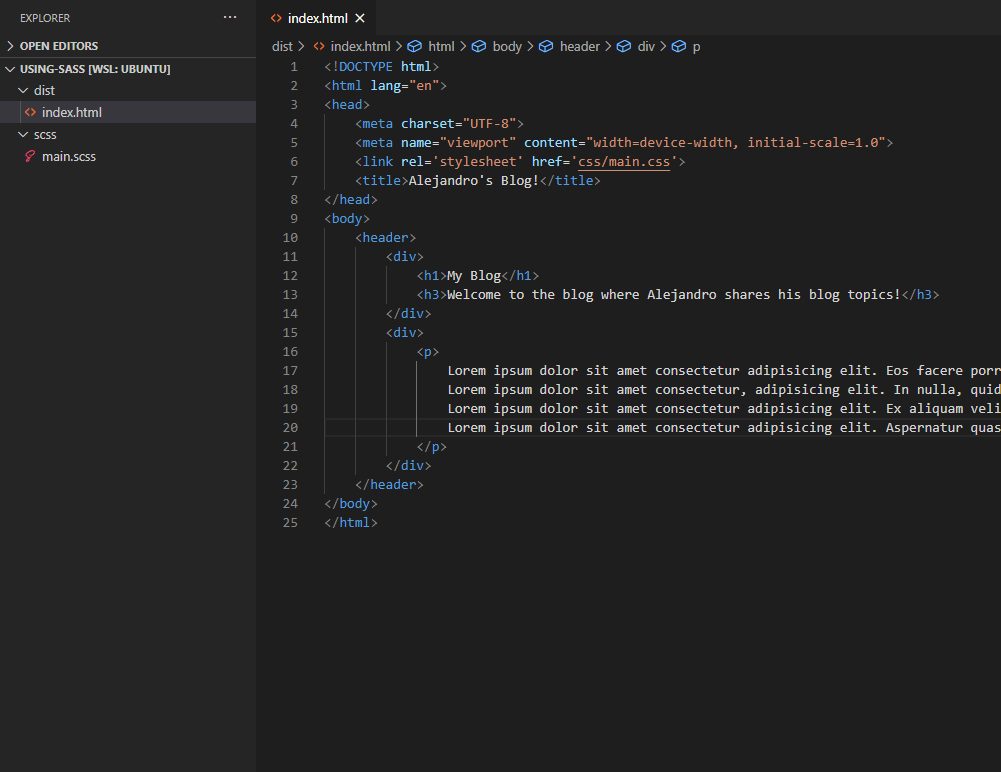
First, let’s specify some classes on our html…

Perfect! Now let’s code in our sass…

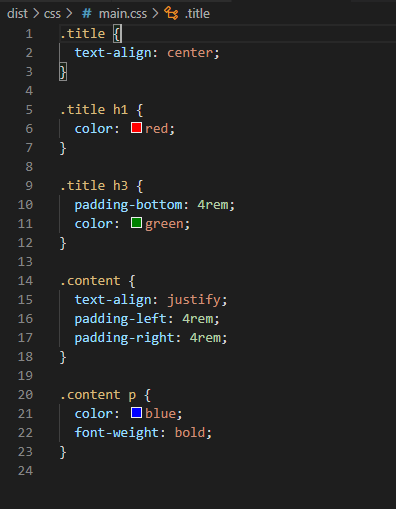
And now let’s see how the CSS turned out!

Nice and tidy! Let’s check out our new blog!

Hmm, perhaps a bit of an artistic flair can make it shine better, but I don’t have any UX or UI designers on call.

Conclusion

Live Sass Compiler can be a powerful to the novice Sass user in plain single page applications that doesn’t really need a front end framework to be built on. React, for example, understands Sass just as well as CSS, so a Live Sass Compiler would be unnecessary there. In a future blog, we will dive into Sass in terms of introduction (how to use it) and the main differences between Sass and CSS.

Using 3rd Party API’s (JS): the Weather Channel

In our last post I went into how AccuWeather offered their data through API’s. I went into the process of signing up for a developer account and managing their documentation to fetch the desired data. This blog post will be similar, with its focus on the Weather Channel, and it’s main purpose is to look at the great contrast in signing up as a developer, navigating their documentation, and their JSON output. I also wrote a post a few weeks ago contrasting AccuWeather and the Weather Channel JSON output so in this post I won’t go into as much detail in that section. If you want to read more about it, check out our post here:

https://alejandrolinan.home.blog/2020/07/25/accuweather-vs-the-weather-channel-apis-and-their-json-outputs/

the Weather Channel: https://weather.com/swagger-docs/call-for-code

Registering

Using the link above you can register. The email portion here is particularly valuable because the api key and login information is sent via email and not shown again on any sort of dashboard. You will receive this email.

Documentation

Now once you have your API key, you have access to this dashboard: https://callforcode.weather.com/ where you can sort through the documentation.

Let’s take a look at the Daily Almanac….

Nothing here is intuitive and there weren’t any instructions on how to use these docs, but with some messing around I was able to decipher how to use this. First, you need to authorize yourself by clicking authorize and then inputting your API key. Now you can click on the geocode to receive some further ‘instruction’.

Here, there are some better instructions and even a link to a google doc with further information! But this link is dead and likely has not been updated in a while. By browsing the documentations further we also saw that some links were functioning that lead to helpful docs, but others were also dead, marking for some inconsistency.

However, the best information is found under the ‘try it out’ button.

Make sure that you have a way to find your current location by latitude and longitude because this API is super specific in this manner and not exactly very user friendly.

And now we get some urls we can use to fetch this information from our own application. Let’s look at one more example.

Here, we are looking at the Daily Forecast. We have authorized ourselves and are ready to dive in! Let’s fill in the ‘Try it out’ form and see what we get back.

It turns out, that we can also see the JSON data outputted back to us in this dashboard. This is actually a helpful feature that most companies with developer API settings offer because it helps with debugging and with checking proper fetch and response statuses.

Conclusion

In short, I wouldn’t say that this API Platform is the most user friendly for developers, especially when compared to AccuWeather. Navigating the docs is dependent a lot on personal knowledge and sleuth skills. Not to mention that the API key isn’t saved in any profile account and if you delete that email that holds your key, good luck trying to get it back, you’ll most likely have to create a new account. The JSON output itself is a little harder to read and work with, but to be fair, that is mostly up to the developer and their own preferences. I also go into that in the previous post contrasting AccuWeather and the Weather Channel: https://alejandrolinan.home.blog/2020/07/25/accuweather-vs-the-weather-channel-apis-and-their-json-outputs/

Questions, thoughts, or disagreements? Feel free to contact me or comment! I’m always eager to hear deeper analysis and different lines of thoughts.

Using 3rd party API’s (JS): AccuWeather

Different companies have different API formats and different ways to access them. As developers, it is our job to figure out how to use them in efficient ways even though the formats may not always be set in the most efficient manner. Today we will explore AccuWeather’s setup, which is very detailed and fairly straightforward.

AccuWeather: https://developer.accuweather.com/

First, we need to create an account…

Once registered, logged in, and confirmed you can get to work! Most API’s require an API key to access information. To do so for AccuWeather you need to create an ‘app’.

NOTE: It’s import that you register the correct programming language when registering for an API key.

And now we recieve our API key!

Now that we are setup we can fetch information. On the AccuWeather API dashboard, an API reference is available, like a table of contents to guide you to the type of information that you want!

Now, in this scenario, a location is important to fetch any useful information about the weather. Otherwise, where would the weather be pointing at? So let’s look at the locations API first.

Looking at the types of location API’s seems daunting at first, and there is plenty to explore! Here we follow one API, a text search, so we can search for cities using text to receive information about that city. What we’re looking for here is for the location key so that we can more easily look for weather conditions in the next fetch request

After sending this request, AccuWeather has a neat feature where you can view the data it returns!

AccuWeather also provide the url that it sends the fetch as. Look closely to the underlined portions.

This is useful when trying to implement this feature to function autonomously.

Now that we have our city key, 347629, we can find weather conditions! Following the same format, let’s look at current conditions of San Francisco

Notice the location key!

And we now know that it is currently mostly sunny in San Francisco at a warm temperature of 64 deg F.

In our next chapter of API’s, we will do the same but with the Weather Channel. It’s important to see how two companies within the same industry have different setups and organizations of information as well as how they display them.

AccuWeather vs the Weather Channel. API’s and their JSON outputs

Sometimes we need to source multiple API’s to get the same type of information and display it with the same coded format. Unfortunately, all API’s aren’t born equal and when we try to fit them into a formatted output, it just won’t work. In this case, it’s because API’s are not always structured the same.

We are going to look at two different weather API sources: the Weather Channel and AccuWeather. Here, we will study the difference in JSON output and the thoughts behind their structured design.

AccuWeather

First we need to go to the developers section at the AccuWeather website located here –> https://developer.accuweather.com/

You’ll need to set up an account to receive your API Key. I will review this process in a future blog, but at the end of the process you can receive different APIs for different information.

First, we obtain an API for conditions depending on our location. We get the link as…

// raw api
http://dataservice.accuweather.com/locations/v1/cities/autocomplete?apikey=BL84oxFsikLXeqZkAcPefEG8okzzcGzu&q=INSERTCITY&language=en-us

// api with city input
http://dataservice.accuweather.com/locations/v1/cities/autocomplete?apikey=BL84oxFsikLXeqZkAcPefEG8okzzcGzu&q=Chicago&language=en-us

The API asks us to search for our location, so I input Chicago. If we fetch the JSON info, we receive this…

fetchCities = () => {
        fetch(`http://dataservice.accuweather.com/locations/v1/cities/autocomplete?apikey=BL84oxFsikLXeqZkAcPefEG8okzzcGzu&q=Chicago&language=en-us`)
        .then(r => r.json())
        .then(cities => {
            console.log('Accu', cities)
           
        })
    }

This returns

Well, we see our desired result in the first item of the list, so let’s refine our fetch to this…

fetchCities = () => {
        fetch(`http://dataservice.accuweather.com/locations/v1/cities/autocomplete?apikey=BL84oxFsikLXeqZkAcPefEG8okzzcGzu&q=Chicago&language=en-us`)
        .then(r => r.json())
        .then(cities => {
            console.log('Accu', cities[0]['Key'])
  
        })
    }

// returns in console window '348308'

Our second API calls for a key to access weather information, so here we need to return the key. Our second API looks like this…

// Raw API
http://dataservice.accuweather.com/currentconditions/v1/CITYKEY?apikey=BL84oxFsikLXeqZkAcPefEG8okzzcGzu&language=en-us

// API with location key
http://dataservice.accuweather.com/currentconditions/v1/348308?apikey=BL84oxFsikLXeqZkAcPefEG8okzzcGzu&language=en-us

Using a similar fetch function we now receive our current conditions…

// cityKey is '348308'

fetchConditions = cityKey => {
        fetch(`http://dataservice.accuweather.com/currentconditions/v1/348308?apikey=BL84oxFsikLXeqZkAcPefEG8okzzcGzu&language=en-us`)
        .then(r => r.json())
        .then(conditions => {
            console.log('Accu', conditions)
        })
    }

Which returns in the console window…

And we receive our data in a neat two step process where any relevant information to a topic is always within its own folder.

the Weather Channel

Similarly to AccuWeather, you also need to set up a developer account for the Weather Channel to receive an API key –> https://callforcode.weather.com/

Here, we go through a similar process as we did for AccuWeather, but this time notice the difference in output of information.

Our location API…

// raw API
https://api.weather.com/v3/location/search?query=CITYLOCATION&locationType=city&language=en-US&format=json&apiKey=320c9252a6e642f38c9252a6e682f3c6

// With Location
https://api.weather.com/v3/location/search?query=Chicago&locationType=city&language=en-US&format=json&apiKey=320c9252a6e642f38c9252a6e682f3c6

And now we fetch…

fetchWeatherChannelCities = () => {
        fetch(`https://api.weather.com/v3/location/search?query=Chicago&locationType=city&language=en-US&format=json&apiKey=320c9252a6e642f38c9252a6e682f3c6`)
        .then(r => r.json())
        .then(cities => {
            console.log('Weather Channel', cities)
        })
}

And we receive…

Already we see a huge difference in information. Each item holds information related to a topic but is it really the best way to order this information? The first item holds all the addresses, the next holds all the states, another holds all the possible cities, and another holds all the possible placeId’s (similar to the city key in the AccuWeather API). Personally, I preferred the AccuWeather way of having all relevant information to a single location within a single list item. Here, we need to look at the index position of the desired location and then go down the object keys to find the second list we want for the next API location key, and then use that first index we found to match the location key we need. Such a long series of confusing steps.

Now, look at this next API we need to fetch for conditions…

// raw API
https://api.weather.com/v3/wx/observations/current?geocode=LATITUDE%2CLONGITUDE&units=e&language=en-US&format=json&apiKey=320c9252a6e642f38c9252a6e682f3c6

// filled API
https://api.weather.com/v3/wx/observations/current?geocode=41.876%2C-87.624&units=e&language=en-US&format=json&apiKey=320c9252a6e642f38c9252a6e682f3c6

Notice how we need a longitude and latitude here instead? Perhaps it’s a much more objective approach to finding a location than simply using a location key as it was in the AccuWeather API, but it can be up to preference.

Now we fetch this API to receive the next set of conditions…

// latitude and longitude are (41.876, -87.624)
fetchWeatherChannelCurrentConditions = (latitude, longitude) => {
        fetch(`https://api.weather.com/v3/wx/observations/current?geocode=${latitude}%2C${longitude}&units=e&language=en-US&format=json&apiKey=320c9252a6e642f38c9252a6e682f3c6
        `)
        .then(r => r.json())
        .then(conditions => {
            console.log('WC', conditions)
        })
}

And this returns…

It makes much more sense than the Weather Channel’s output for location information. However, we have another problem here. There’s such more information and much of it seems redundant or nit picky. It might have been better to contain all Precipitation information within a list, all temperature in a list, all pressure in a list, and so on. The AccuWeather conditions output in contrast was much neater by this standard.

Conclusion

All in all, I preferred AccuWeather’s style in structure, where all relevant information for a location is stored within its own object rather than divided by its topics and locations in various lists. I’m sure there are their own benefits and cons for each structure, but AccuWeather provides a much neater thought process to work with.

In future blogs, I will dive into the process of creating developer accounts for API’s and API Keys. I will also explore the process of organizing different API JSON outputs into more consistent structures for easier code workflow.

React.js, proper hygienic file structure

When I first learned React, I didn’t learn a good way to organize my files and folders. At the time, I thought everything made sense and that my folder structure was straightforward, but the more I added to it and the larger my application grew, the more I started having a hard time searching for the files I needed. I had to rely on searching the file names rather than simply knowing the folder hierarchy.

Luckily, I later collaborated with a friend on a project and he showed me a much better way to maintain structure. Instantly, I saw its superiority. Since then everything makes much more sense, making it easier to organize code in my head making my coding environment much more relaxed.

Bad File Structure

Here is an example of bad folder and file structure I had when I first started using React. In hindsight, it looks incredibly messy and hard to sift through. Furthermore, almost nothing is intuitive and very little information can be gained by looking at it.

At first look, it doesn’t look so bad, huh? Well, not so much, we can already see some obvious flaws here. First, we notice an images folder at the top of the chain, holding all of the applications images. While, this might be passable if it held images that are used globally, this still an inappropriate place to have it, and worse it gives no naming context. Second, we see a .css file at the top chain, as well. Similarly, it wouldn’t it be so bad for global use, but it holds no useful naming convention and it definitely shouldn’t house all of the applications styling code.

More problems! Action and Reducer files are messy and unorganized, furthermore, image files are named inconsistently.

It hurts to look at. The components are scattered, messy, and unorganized. The naming convention gives some information, but it could be so much better. Even worse, we have wild js files outside of all the component folders, even though those files are components themselves!

Good File Structure

Now we will look at something that’s easier on the eyes. It gives better information just through the naming and structure. It also organizes relevant information within clusters so that random files are stored in non-intuitive locations. Small disclaimer, this is my take on good file structure and what I consider to be an incredible improvement over my past tendencies.

Nearly Everything is stored in these five folders: actions, components, functions, reducers, and scss (I prefer Sass over css). Some may also prefer to store their css styling within the component folder that it’s directly used.

Inside our scss folder we have all of our styling files, which are messy but also organized. Organized by naming convention and messy because of the number of files. This is easily the most messy part of the ‘good hygiene’ portion of this blog.

Next, we have our reducers and our actions, all of which are organized into sub-folders so that all of the possible actions/reducers for any individual component stays together. I also included a functions folder to house any general functions that would be used multiple times across different components.

The most important section, are the components. Firstly, I have a global folder which houses the components that are always in view. Most often these are a nav bar and a footer. Next, we have sub-folders that hold single page view components. These may also be divided further, for example, if you are showing an article of news and want to display the comments of that article as well. Here the comments don’t need to be separate to the article, because comments depends on the article, but they don’t need to be crammed into one file either. I find this file structure easy to navigate and manage.

Conclusion

Personally, this new way of navigating and managing my code has done wonders in terms of enjoyment, brain clutter, and moving forward. Admittedly, some parts of my structure could be changed depending on personal preference, but as a whole this is a very clear way to organize your code and a great way to keep it future proof.

SetTimeout and SetInterval (javascript)

Recently I re-came across these two javascript methods. They’re a real neat piece to use rather than trying to track a current time and updating elements accordingly. Instead, they’re a great, simple way to create continuous updates without a window change or refresh.

The Basics

setTimeout(f, t) takes two inputs, a function and a time limit (measured in milliseconds). The function waits for the allotted time ‘t’ and executes once.

// example, run in console
// the function logExample will log 'hello there' after waiting 5 seconds

function logExample(){
   console.log('hello there!')
}

const testOne = setTimeout(logExample, 5000)

testOne

setInterval(f, t) is slightly trickier. setInterval also takes in a function and a time, just like setTimeout(), however, setInterval executes code multiple times.

// example, run in console
// the function secondExample will log 'you are a bold one!' every 5 seconds

function secondExample(){
   console.log('you are a bold one!')
}

const testTwo = setInterval(secondExample, 5000)

testTwo

Oh! But it won’t stop now! How do we clear this interval now that we started it. Come to think of it, what if we also wanted to stop setTimeout before it executed? Is it really possible to change the future after regret sets in?

Clearing setTimeout

setTimeout and setInterval are cleared in very similar ways. clearTimeout will clear the Timeout, and clearInterval will clear the Interval. There is a small catch, for clearTimeout to work, we must execute this method before the function called in setTimeout is executed.

// clearTimeout example, pt 1

function hello(){
   console.log('Hello World!')
}

function timeHello(){
   let world = setTimeout(hello, 5000)
}

timeHello()
// after five seconds it will log: 'Hello World!'

Now if we add a clearTimeout within our timeHello function.

// clearTimeout example, pt 2

function hello(){
   console.log('Hello World!')
}

function timeHello(){
   let world = setTimeout(hello, 5000)
   clearTimeout(world)
}

timeHello()
// after five seconds it still wont' have logged anything, in fact, it would appear as if nothing happened

Clearing setInterval

clearInterval can be more forgiving that clearTimeout, that it doesn’t matter if setInterval executes once, twice, or none at all. clearInterval will stop the setInterval after it has already been called.

// clearInterval example, pt 1

function hello(){
   console.log('Hello World!')
}

let world = setInterval(hello, 1000)
world

// will log 'Hello World!' once, every second.

However, if we add an clearInterval after a certain period of time (using setTimeout)

// clearInterval example, pt 2

function hello(){
   console.log('Hello World!')
}

function stopHello(){
   clearInterval(world)
}

let world = setInterval(hello, 1000)
world

setTimeout(stopHello, 5000)

// will log 'Hello World!' 5 times (in five seconds) and stop.

Conclusion

In principle these methods may seem simple, but using them isn’t always as straightforward as it may immediately seem. Mastering them is vital to the everyday programmer and can be useful in any variety of settings. Below are some links to further your understanding of these methods.

Design a site like this with WordPress.com
Get started